Showing posts with label gtk. Show all posts

Sunday, March 23, 2014

Gtk3 hit-a-hint: mouseless navigation module

I present gtkhah, a gtk module for hit-a-hint mouseless navigation of gtk3 applications.
It's been inspired by the various hit-a-hint browser extensions.
Usage at the project homepage. Here's a quick screenshot of Gedit:


Thursday, November 22, 2012

Grab focus on Gtk Widget

Many times I had to give focus to a newly created Gtk widget that still had to be mapped to screen. Since widget.grab_focus() does not work if the widget is not displayed on the screen, then I always used an idle source to delay the operation.
Today I noticed that the idle may be too late: if the user is writing something, then some key strokes may be lost because the idle runs slightly after the widget has been mapped. You may think that's imperceptible to the user, but that's not true in some cases.

So I've tried connecting to the map, map-event and show signals (also "after"), without success: the handler is called slightly before the right time thus grab_focus() will not work.

Then I ended up with this working solution, that will grab the focus as soon as the widget is first drawn to the screen:

void focus_widget (Widget widget) {
  // it may be already displayed
  widget.grab_focus ();
  // grab focus right after the widget is drawn
  // for the first time
  ulong sigid = 0;
  sigid = widget.draw.connect (() => {
    widget.grab_focus ();
    widget.disconnect (sigid);
    return false;
  });
}

I still don't know exactly what's the best way to grab focus as soon as the widget can really grab it. So if you have any better idea, please let me know :-)

Friday, April 02, 2010

Valagtkdoc 1.0

Hello,
yes... this is the nth program I'm writing in this period. I hope this is the last one :)

Valagtkdoc is a tool that integrates Vala with GTK-Doc for documentation generation.

You can find download and example usage at the homepage.

I think it's far from being perfect, and actually I haven't tried integrating it with autotools, but it shouldn't be that hard. Unfortunately, you have to somehow break the gtk-doc rule "do not run it manually" because valagtkdoc goes in the middle between gtkdoc-scan and gtkdoc-mkdb.

If anybody has a better solution, please tell me :)

Tuesday, February 16, 2010

Secure and Decentralized Chat

Hello,
I'm writing to let you know of the first release of SDChat.
It is a protocol with libraries and programs to create secure IM networks using GPG and RSA.
All the stack is written in Python but the page says it will be rewritten from scratch to provide a C API.

It features a GTK+ interface with many plugins (unfortunately audio and video are being broken due to gstreamer updates) and a simple server for routing. No installation is required.

Wondering if this can be any useful for Iranians.

Friday, November 27, 2009

Mimaggia, cairo tester

Hello,
From GNOME

I've created a simple pygtk project for testing cairo statements. It includes a sort of terminal where you write statements in a simple language. It features immediate preview of what you write.

Say it's a new format for images.
If you want to test it and see the code, ask me.

Sunday, August 09, 2009

Spadi source code

Hello,
after I've written really a few docs, and cleaned up some stuff, I've published the code of both Spadi and Corraza on gitorious here. In the while, I've added support for floors and closeable views.
Help... help is needed.

Stay tuned.

Thursday, August 06, 2009

Constructing a free ArchiCAD alternative

Hello,
together a couple of university mates we talked about a possible free (as in freedom) ArchiCAD alternative. There are several free CAD out there but none is free for architects/engineers. The project is too big and ambitious, but I wanted to give OpenGL a shot with this excuse to learn something new.

I've started two projects:
  • Corraza, the OpenGL framework for editing 3d objects and exporting the scene graph to ray tracing software... think about a very very very minimal blender but as library
  • Spadi, the GTK+ application that runs on top of Corraza

You can find a video here to see what it can do now, after a week of development.
There's no code published at the moment, contact me if you would like to join the development.

Stay tuned.

Monday, May 18, 2009

Blogging from Epiphany WebKit

Hello,
I've been using Midori for a while. It's a great browser: innovative and light. However all my bookmarks and data are in Epiphany. Last week the new epiphany-webkit version has been uploaded in Debian Sid and I couldn't wait to test it. I'm currently using it instead of gecko; it has still some issues but I begun living without it.

Sunday, April 26, 2009

Create a GdkPixbuf from cairo surface

Hello,
here's the inverted code snippet of the previous post.

w, h = surface.get_width(), surface.get_height()

pixmap = gtk.gdk.Pixmap (None, w, h, 24)

cr = pixmap.cairo_create ()

cr.set_source_surface (surface, 0, 0)

cr.paint ()

pixbuf = gtk.gdk.Pixbuf (gtk.gdk.COLORSPACE_RGB, True, 8, w, h)

pixbuf = pixbuf.get_from_drawable (pixmap, gtk.gdk.colormap_get_system(), 0, 0, 0, 0, w, h)

Sunday, December 21, 2008

Global keybinding on X

Hello,
lately I've been looking for a way to create a desktop-wide keybinding for FreeSpeak.
I first looked into Tomboy and Deskbar source codes but the egg was too huge to be adopted, and it would have brought C dependency which isn't always nice for a Python project.
Then fargiolas pointed me to a blog post where I could find about gnome keybindings owned by gnome control center. Well that was only a mirage as it doesn't really grab the key but it's only a visual entry in the keyboard shortcuts preferences.
After a few days I've finally found a not-so-hackish solution in about one hundred lines of Python code.

Here is the snippet (download), only using Xlib and GTK+ Python bindings.

Sample usage:

def callback (keybinding):
print 'Callback!'
gtk.main_quit ()

gtk.gdk.threads_init ()
keybinding = GlobalKeyBinding ("/apps/appdir", "key_binding")
keybinding.connect ('activate', callback)
keybinding.grab ()
keybinding.start ()
gtk.main ()


The only problem is that it doesn't make use of GDK filters because PyGTK doesn't provide such function wrappers and there's no GDK-to-Xlib mapping available.
But yes, it works very good.

Monday, December 01, 2008

Aptitude-gtk progress

Hello,
I was curious to see if aptitude-gtk was making some progress. I haven't followed the project since it's been merged into aptitude.
Well, I found it more functional and complete. Here's a screenshot showing pending packages for upgrade after an update:
From GNOME

The team is definitely doing a good job. Hopefully I'll find the time to give some help as I'm really interested in such full-featured GUI frontend.
Keep going on!

Sunday, November 30, 2008

FreeSpeak gains translation suggestions

Hello,
it hasn't been a long time since FreeSpeak 0.2.0 has been released. One of the TODOs for the next release was to support open-tran, and more over translation suggestions for development.
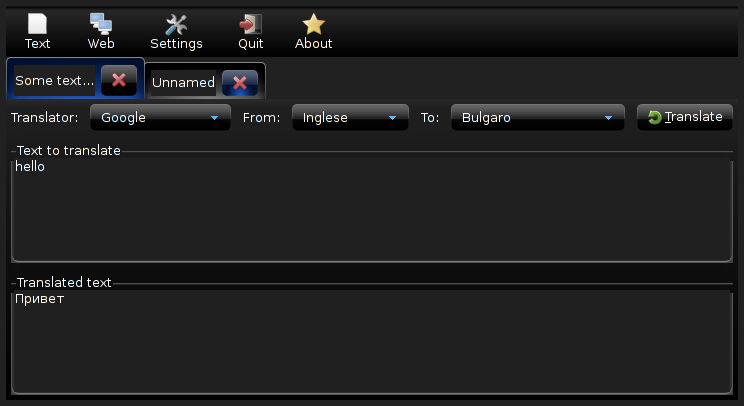
This is a screenshot of what's been included in the repository today:
From GNOME
FreeSpeak is a GNOME frontend to online translator engines.

Friday, November 28, 2008

FreeSpeak 0.2.0 has been released

Hello,
after some work in these weeks now I have released a new version of FreeSpeak.

FreeSpeak is a free (as in freedom, developed and released under the terms of GPL) frontend to online translator engines (such as Google, Yahoo, etc.). It is written in Python, it uses the GTK toolkit and some GNOME infrastructure features


.
It's been rewritten almost from scratch so I think there's no need to post release notes here. Anyway you can always read what changed from the old version released a couple of years ago here.

Notice that the project homepage has been changed. The project has now moved to BerliOS.de.

Sunday, November 23, 2008

Replace GTK+ with Clutter for fun

Hello,
lately I was having fun with Clutter and Python. I've started by creating some Gtk-like widgets (such as GtkWindow, GtkBox, and GtkButton) in Clutter.
Well, this is the result... it's a simple example of a very poor toolkit, but it works:

Try it, it's only one .py file source code

Sunday, November 16, 2008

Single app instances, Python and DBus

Hello,
I'm working on FreeSpeak lately and I needed to run the application once per session, as it's got a trayicon and a notebook (maybe windows with an applet is better?)
I decided to use DBus for making the application run only a single instance; when you try to open it again it won't start another process, instead it will use the already running one.

This is how I would create a generic single app instance with dbus-python:
import dbus
import dbus.bus
import dbus.service
import dbus.mainloop.glib
import gobject

class Application (dbus.service.Object):
def __init__ (self, bus, path, name):
dbus.service.Object.__init__ (self, bus, path, name)
self.loop = gobject.MainLoop ()

@dbus.service.method ("org.domain.YourApplication",
in_signature='a{sv}', out_signature='')
def start (self, options={}):
if self.loop.is_running ():
print 'instance already running'
else:
self.loop.run ()

dbus.mainloop.glib.DBusGMainLoop (set_as_default=True)
bus = dbus.SessionBus ()
request = bus.request_name ("org.domain.YourApplication", dbus.bus.NAME_FLAG_DO_NOT_QUEUE)
if request != dbus.bus.REQUEST_NAME_REPLY_EXISTS:
app = Application (bus, '/', "org.domain.YourApplication")
else:
object = bus.get_object ("org.domain.YourApplication", "/")
app = dbus.Interface (object, "org.domain.YourApplication")

# Get your options from the command line, e.g. with OptionParser
options = {'option1': 'value1'}
app.start (options)
How it works?
  1. Setup the mainloop for dbus
  2. Request a session bus name, so that other applications (in our case another instance of the same application) can connect to it
  3. Create a new instance at path / if the bus name doesn't exist (so we are the primary owner). If it exists, then obtain the object from dbus and call the method on the remote Application object using the known interface.
  4. The Application.start method checks if it's already running then decide what to do in both situations.
Creating a GTK+ application this way is really easy. It only needs to use the GTK+ mainloop.
Let's suppose we want to present() the GtkWindow when the user tries to open another instance of the application:
import dbus
import dbus.bus
import dbus.service
import dbus.mainloop.glib
import gobject
import gtk
import gtk.gdk
import time

class Application (dbus.service.Object):
def __init__ (self, bus, path, name):
dbus.service.Object.__init__ (self, bus, path, name)
self.running = False
self.main_window = gtk.Window ()
self.main_window.show_all ()

@dbus.service.method ("org.domain.YourApplication",
in_signature='', out_signature='b')
def is_running (self):
return self.running

@dbus.service.method ("org.domain.YourApplication",
in_signature='a{sv}i', out_signature='')
def start (self, options, timestamp):
if self.is_running ():
self.main_window.present_with_time (timestamp)
else:
self.running = True
gtk.main ()
self.running = False

dbus.mainloop.glib.DBusGMainLoop (set_as_default=True)
bus = dbus.SessionBus ()
request = bus.request_name ("org.domain.YourApplication", dbus.bus.NAME_FLAG_DO_NOT_QUEUE)
if request != dbus.bus.REQUEST_NAME_REPLY_EXISTS:
app = Application (bus, '/', "org.domain.YourApplication")
else:
object = bus.get_object ("org.domain.YourApplication", "/")
app = dbus.Interface (object, "org.domain.YourApplication")

# Get your options from the command line, e.g. with OptionParser
options = {'option1': 'value1'}
app.start (options, int (time.time ()))
if app.is_running ():
gtk.gdk.notify_startup_complete ()
How it works?

Let's say we're running the Application for the first time, the loop begins and when it ends running is set to False, so gtk.gdk.notify_startup_complete() won't be called. Instead, if the application is already running, start() will be called on the remote object running the loop. The method then returns immediately so gtk.gdk.notify_startup_complete() will be called.
If you don't notify to the launcher that the startup is complete... guess what happens to your mouse and to your taskbar panel...

If the loop is running, the window is presented to the user with a little delay. If you don't use any timestamp, the UI interaction won't let the window have the time to be presented.

Of course, you can use DBus for many more things, like both setting options from the command line, as explained in the above code, and let other applications communicate with yours and viceversa.
Nowadays almost all systems use DBus, so it won't be a pain to add such dependency. In my opinion, it would be much more painful to use lock files, FIFO, unix sockets or whatever. FreeSpeak used such old technologies and it was a very poor emulation of what DBus already offers.

Tuesday, October 14, 2008

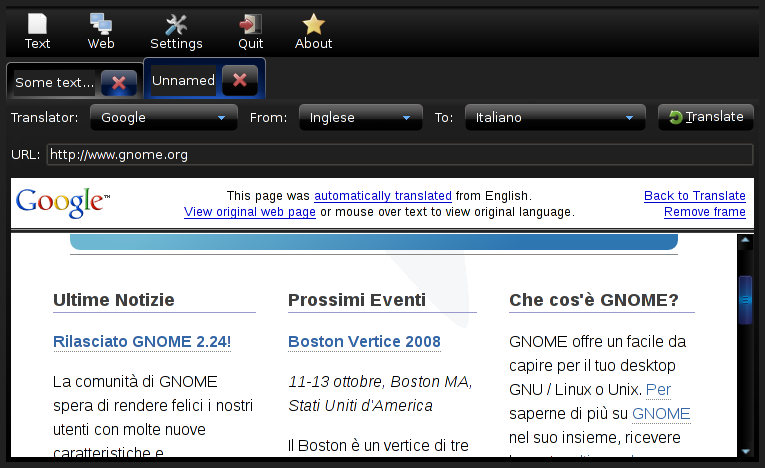
FreeSpeak, a GTK+/GNOME translator

Hello,
I've worked on FreeSpeak a couple of years ago, a Python/GTK+/GNOME project to translate text and web pages by querying already existing online translation tools.
PRO: It has been packed for Ubuntu and it has been publicized by a journal in Italy.
CONS: It has been discontinued until now. In fact I restarted the project and I'm doing a huge refactoring because of the ugly code I wrote in the past.


It's already working, but some features are still missing.
The new approach will allow applications to use FreeSpeak as a Python library to embed the translation widgets.


Contact me if you intend to help the project with suggestions, bug reports, critiques and coding.

Monday, September 08, 2008

GTK Apps to replace Gnome Files

Hello,
everyone knows that gnomefiles has went offline with that boring redirect to osnews.com.
Now many people is looking toward gtk-apps.org, I didn't know it before. It's looking really good.
The only problems is that I had (and I guess I'm not the only one) a few unmaintained projects on gnomefiles and they are now lost.
I'm wondering if it will be publicized a day by gtk.org to be something more official.

Saturday, August 16, 2008

Vagalume, GTK+ and Last.fm

I've found this great gstreamer application to listen to the last.fm stations. It works perfectly, fully functional and up-to-date. Features several IM status updates, including telepathy. It's definitely good-looking with my dark theme.
Homepage: http://vagalume.igalia.com/
Last.fm group: http://www.last.fm/group/Vagalume

Thursday, August 07, 2008

Gnome main menu


Gnome main menu
Originally uploaded by Lethalman
Hello,
while I was playing with apt-cache I've discovered a new kind of main menu in GNOME. It's being developed by SuSE. It feels nice, robust and innovative.
The screenshot is showing the documents tab.
To install, aptitude install gnome-main-menu and add the new applet.

Friday, May 23, 2008

Syx, GTK+ and threading

Hello,
you all know that Gtk+ has locks for the GUI when dealing with the X server and prevent async events to be sent. This is done by manually acquiring/releasing the lock on Gdk. Many Gtk+ ports don't do this automatically.

Syx used gtk_main() into a thread and automatically put gdk enter/leave for each function in its wrapper. It would be somewhat ugly in Smalltalk code having to enter/leave each time.
Of course, on Windows everything leads to troubles with threads.

But Smalltalk has Processes, handled by an internal scheduler. I decided then to not create a thread but cycle through Gtk+ events in the scheduler itself. Now everything works correctly.

Difference with other wrappers? The way Smalltalk is thought let you perform multi-tasking without the need to use OS threads, which means no problems on Windows and no need to take care of the Gdk lock everytime.

In addition, I rewrote part of the Console (Smalltalk-side) to be asyncronous using Semaphores. Now you can work on widgets after you run Gtk main! A small example:

Smalltalk YX 0.1.7 is ready.
Type "help!" to get help.
> Smalltalk loadPlugin: 'gtk'!
true
> | w |
> w := GtkWindow new.
> Gtk main.
> w add: (GtkLabel new: 'hello').
> w showAll!
a GtkWindow
You can imagine the result ;)
If you want to try it out you can download the scheduler branch snapshot.

Stay tuned for next 0.1.7 release.