Sunday, November 30, 2008

FreeSpeak gains translation suggestions

Hello,
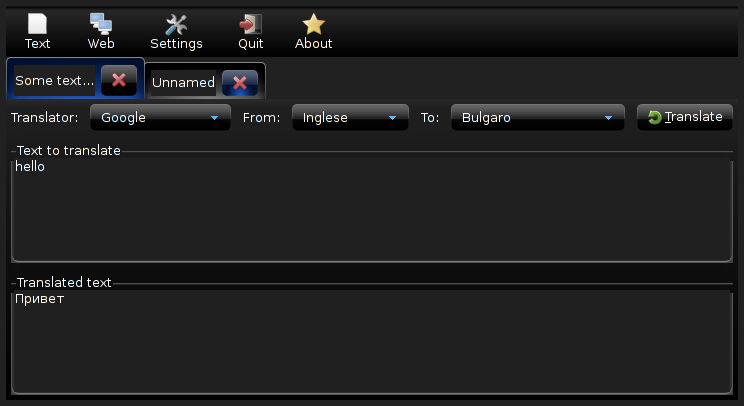
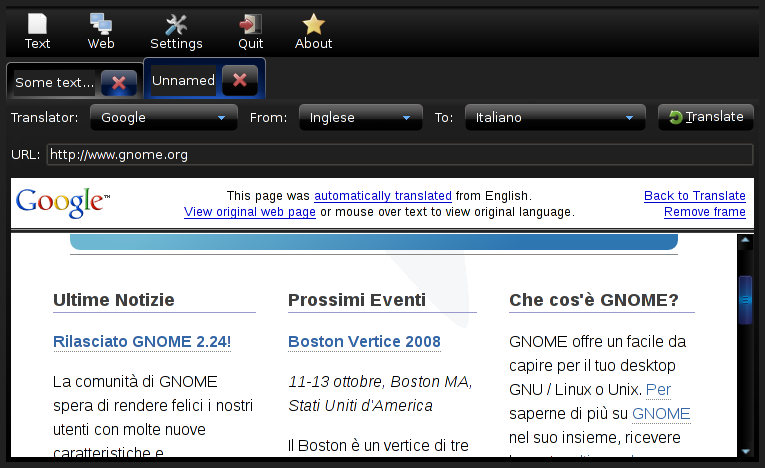
it hasn't been a long time since FreeSpeak 0.2.0 has been released. One of the TODOs for the next release was to support open-tran, and more over translation suggestions for development.
This is a screenshot of what's been included in the repository today:
From GNOME
FreeSpeak is a GNOME frontend to online translator engines.

Friday, November 28, 2008

FreeSpeak 0.2.0 has been released

Hello,
after some work in these weeks now I have released a new version of FreeSpeak.

FreeSpeak is a free (as in freedom, developed and released under the terms of GPL) frontend to online translator engines (such as Google, Yahoo, etc.). It is written in Python, it uses the GTK toolkit and some GNOME infrastructure features


.
It's been rewritten almost from scratch so I think there's no need to post release notes here. Anyway you can always read what changed from the old version released a couple of years ago here.

Notice that the project homepage has been changed. The project has now moved to BerliOS.de.

Sunday, November 23, 2008

Replace GTK+ with Clutter for fun

Hello,
lately I was having fun with Clutter and Python. I've started by creating some Gtk-like widgets (such as GtkWindow, GtkBox, and GtkButton) in Clutter.
Well, this is the result... it's a simple example of a very poor toolkit, but it works:

Try it, it's only one .py file source code

Sunday, November 16, 2008

Single app instances, Python and DBus

Hello,
I'm working on FreeSpeak lately and I needed to run the application once per session, as it's got a trayicon and a notebook (maybe windows with an applet is better?)
I decided to use DBus for making the application run only a single instance; when you try to open it again it won't start another process, instead it will use the already running one.

This is how I would create a generic single app instance with dbus-python:
import dbus
import dbus.bus
import dbus.service
import dbus.mainloop.glib
import gobject

class Application (dbus.service.Object):
def __init__ (self, bus, path, name):
dbus.service.Object.__init__ (self, bus, path, name)
self.loop = gobject.MainLoop ()

@dbus.service.method ("org.domain.YourApplication",
in_signature='a{sv}', out_signature='')
def start (self, options={}):
if self.loop.is_running ():
print 'instance already running'
else:
self.loop.run ()

dbus.mainloop.glib.DBusGMainLoop (set_as_default=True)
bus = dbus.SessionBus ()
request = bus.request_name ("org.domain.YourApplication", dbus.bus.NAME_FLAG_DO_NOT_QUEUE)
if request != dbus.bus.REQUEST_NAME_REPLY_EXISTS:
app = Application (bus, '/', "org.domain.YourApplication")
else:
object = bus.get_object ("org.domain.YourApplication", "/")
app = dbus.Interface (object, "org.domain.YourApplication")

# Get your options from the command line, e.g. with OptionParser
options = {'option1': 'value1'}
app.start (options)
How it works?
  1. Setup the mainloop for dbus
  2. Request a session bus name, so that other applications (in our case another instance of the same application) can connect to it
  3. Create a new instance at path / if the bus name doesn't exist (so we are the primary owner). If it exists, then obtain the object from dbus and call the method on the remote Application object using the known interface.
  4. The Application.start method checks if it's already running then decide what to do in both situations.
Creating a GTK+ application this way is really easy. It only needs to use the GTK+ mainloop.
Let's suppose we want to present() the GtkWindow when the user tries to open another instance of the application:
import dbus
import dbus.bus
import dbus.service
import dbus.mainloop.glib
import gobject
import gtk
import gtk.gdk
import time

class Application (dbus.service.Object):
def __init__ (self, bus, path, name):
dbus.service.Object.__init__ (self, bus, path, name)
self.running = False
self.main_window = gtk.Window ()
self.main_window.show_all ()

@dbus.service.method ("org.domain.YourApplication",
in_signature='', out_signature='b')
def is_running (self):
return self.running

@dbus.service.method ("org.domain.YourApplication",
in_signature='a{sv}i', out_signature='')
def start (self, options, timestamp):
if self.is_running ():
self.main_window.present_with_time (timestamp)
else:
self.running = True
gtk.main ()
self.running = False

dbus.mainloop.glib.DBusGMainLoop (set_as_default=True)
bus = dbus.SessionBus ()
request = bus.request_name ("org.domain.YourApplication", dbus.bus.NAME_FLAG_DO_NOT_QUEUE)
if request != dbus.bus.REQUEST_NAME_REPLY_EXISTS:
app = Application (bus, '/', "org.domain.YourApplication")
else:
object = bus.get_object ("org.domain.YourApplication", "/")
app = dbus.Interface (object, "org.domain.YourApplication")

# Get your options from the command line, e.g. with OptionParser
options = {'option1': 'value1'}
app.start (options, int (time.time ()))
if app.is_running ():
gtk.gdk.notify_startup_complete ()
How it works?

Let's say we're running the Application for the first time, the loop begins and when it ends running is set to False, so gtk.gdk.notify_startup_complete() won't be called. Instead, if the application is already running, start() will be called on the remote object running the loop. The method then returns immediately so gtk.gdk.notify_startup_complete() will be called.
If you don't notify to the launcher that the startup is complete... guess what happens to your mouse and to your taskbar panel...

If the loop is running, the window is presented to the user with a little delay. If you don't use any timestamp, the UI interaction won't let the window have the time to be presented.

Of course, you can use DBus for many more things, like both setting options from the command line, as explained in the above code, and let other applications communicate with yours and viceversa.
Nowadays almost all systems use DBus, so it won't be a pain to add such dependency. In my opinion, it would be much more painful to use lock files, FIFO, unix sockets or whatever. FreeSpeak used such old technologies and it was a very poor emulation of what DBus already offers.

Monday, October 20, 2008

ping.fm is dead

Hello,
lately I've been using ping.fm for a couple of weeks because I've found it really useful.
Today I've tried to update my status through sending a mail but I received delivery failures... I then discovered that ping.fm is dead!

Tuesday, October 14, 2008

FreeSpeak, a GTK+/GNOME translator

Hello,
I've worked on FreeSpeak a couple of years ago, a Python/GTK+/GNOME project to translate text and web pages by querying already existing online translation tools.
PRO: It has been packed for Ubuntu and it has been publicized by a journal in Italy.
CONS: It has been discontinued until now. In fact I restarted the project and I'm doing a huge refactoring because of the ugly code I wrote in the past.


It's already working, but some features are still missing.
The new approach will allow applications to use FreeSpeak as a Python library to embed the translation widgets.


Contact me if you intend to help the project with suggestions, bug reports, critiques and coding.

Thursday, September 11, 2008

Debian Get Satisfaction


Hello,
lately I've found getsatisfaction, a social web2 free customer support for all companies and products.
Of course, what have I done is to look for the Debian company. Well it's there, but unused.

  1. Easy for novice users to ask and find answers there.
  2. You can share you ideas and get help
  3. Report problems and get help on bug reporting
  4. General and specific discussion
  5. Subdivide the service in variuos products (for examples ports and distributions)

Monday, September 08, 2008

GTK Apps to replace Gnome Files

Hello,
everyone knows that gnomefiles has went offline with that boring redirect to osnews.com.
Now many people is looking toward gtk-apps.org, I didn't know it before. It's looking really good.
The only problems is that I had (and I guess I'm not the only one) a few unmaintained projects on gnomefiles and they are now lost.
I'm wondering if it will be publicized a day by gtk.org to be something more official.

Saturday, August 23, 2008

Where are you? Yahoo! Fire Eagle

Hello,
the Twitter question was "What are you doing?". The new question is now "Where are you?"

Yahoo! has launched a sort of social application called Fire Eagle for updating your location and share it across other web services.

Saturday, August 16, 2008

Cincom Industry Misinterpretations reached the 100th podcast


Hello,
I'm listening to the Industry Misinterpretations podcasts (though my English is so poor to understand only a few words) and now they reached the century mark. They're managing an account on Podcast Alley.

Stay tuned!

Interviewed by Clubsmalltalk

Hello,
lately I've been interviewed by the new clubsmalltalk. Hey, I know, I'm not so good with English ;)
I'm glad of this, thanks to Hernan Galante.

Vagalume, GTK+ and Last.fm

I've found this great gstreamer application to listen to the last.fm stations. It works perfectly, fully functional and up-to-date. Features several IM status updates, including telepathy. It's definitely good-looking with my dark theme.
Homepage: http://vagalume.igalia.com/
Last.fm group: http://www.last.fm/group/Vagalume

Monday, August 11, 2008

Compiz with ATI RS480 on Debian

Hello,
after years that compositing has been introduced in our desktop, it's finally come the time to try it.

Uninstall fglrx
My video card is not supported very well with Mesa 7.0.x, in fact I've been using the fglrx driver for a long time.... until now!
I had to manually dpkg --purge all the related packages.
Now it's better to rmmod fglrx.

Install mesa 7.1 from experimental
On #compiz-fusion some guys hinted me I should have used Mesa 7.1rc because of recent improvements on my video card. The only way to get such version was to include experimental sources.
Ok, no problem, if it doesn't work I can downgrade back to the previous one.

Upgrade xorg to experimental
But there're still problems, I had to upgrade to the latest xorg in experimental because of mesa compatibility. In fact AIGLX couldn't load DRI drivers because of missing symbols.
I had to dpkg -l|grep xorg the install the one by one. I did pray for everything to work, really.
Now backup xorg.conf and go ahead with X -configure.

Install compizconfig-settings-manager and compiz-fusion-plugins-extra
For some reason, the first time I've tried running compiz it's gone Segmentation Fault. On the IRC channel they hinted me to install the crash handler plugin to back track the error. After installing such packages, magically compiz --replace worked!
Now I have a GNOME Desktop with the Blue-Joy theme and the Avant Window Navigator.

Everything both nice and unuseful, but now I understand how eye-candy fancy stuff can change your desktop.

Before the war:


After:

Thursday, August 07, 2008

iStream


iStream
Originally uploaded by Lethalman
Very useful applet for listening to the radio. It lacks a perferences dialog, but it's still nice.

Gnome main menu


Gnome main menu
Originally uploaded by Lethalman
Hello,
while I was playing with apt-cache I've discovered a new kind of main menu in GNOME. It's being developed by SuSE. It feels nice, robust and innovative.
The screenshot is showing the documents tab.
To install, aptitude install gnome-main-menu and add the new applet.

kqemu on Debian amd64

Hello,
I've been using qemu a lot lately because I'm creating an usb hdd with debian live.
The image contains a system running postgresql, development packages for gtk and python and gnome-core . All this ends up loading in more than 5 minutes, this is really boring.

Then I begun looking for a faster virtualization system, and found KVM. Unfortunately my processor hasn't the right flag for it.

Finally I found kqemu, which is a module for the kernel that speeds up a lot qemu. I never thought it could speed up things...... so.... much!
Let's install it:
m-a a-i kqemu
modprobe kqemu
That's it, for those who owns an amd64 processor, this is the right way to use kqemu:
qemu-system-x86_64 -kernel-kqemu [your options]
You shouldn't get any error, if you do... boh.

The image now boots in 33 seconds down to the bottom init scripts, and GNOME works only with a slight delay but it's definitely a great speed up. With the real machine, I enter gnome in about 40 seconds.

Keep going the good work Qemu team, and thanks as usual to everyone who helped me on IRC.

Wednesday, August 06, 2008

Debian and zd1211 wifi

Hello,
I'm using debian lenny and I've got these two problems:

  • With versions of the linux kernel prior to 2.6.20 (maybe) I could install zd1211 firmware using the module-assistant which has been now dropped from testing and unstable.
  • Boot process slowed down by 30 seconds and couldn't plug-in the usb pen because udev/hal screw up

What I've done is to remove the source and its created firmware, with the one shipped with testing and unstable (bug #411912):

aptitude remove --purge zd1211-firmware zd1211-source
aptitude update
m-a clean zd1211
aptitude install zd1211-firmware

Now let's fix the hotplug part, open /etc/udev/rules.d/z25_persistent-net.rules and remove similar lines:
# USB device 0ace:1215 (zd1211rw)
SUBSYSTEM=="net", DRIVERS=="?*", ATTR{address}=="00:1d:0f:b3:66:f7", NAME="eth2"
Now try to detach and reattach your usb pen and everything should magically work.

Thanks to Nss (#debianizzati), dcbw NetworkManager developer and gsimmons (#debian).

Sunday, July 13, 2008

Syx gaining more stability and speed

Hello,
in the new branches of Syx (an open source Smalltalk-80 implementation) we're working to try a new kind of memory management and add many features that have been missed until now to focus on other stuff.

The new faster and more modern v0.1.8 release will contain the following refactoring:
  • Objects will be variable-length (minumum 12 bytes on 32-bit processors and 16 bytes on 64-bit processors)
  • By changing the objects also the GC changed to a mark and compact GC
  • Threaded-switch statement to run processes
  • More efficient method cache (maybe a simple global cache lookup for this release)
API for primitives will only change slightly.

Suggestions for any new particular technologies are welcome.

Thursday, July 03, 2008

identi.ca is worse

Hello,
I'm using Twitter in this week and the API works "almost" perfectly while the website is down most of the time.
I've recently heard about identi.ca, so I decided to try it.
My first impression was bad, because I've seen many redirects of the page, and DNS changes sometimes.
But ok, I tried to register and again... I had problems. When I submitted the registration twice it just did nothing.
I then waited for a couple of hours then I've been registered to identi.ca.

Once I tuned all my account settings, the service has gone down. What happened? Too many twitterers have switched and now identi.ca is out of service? In the while Twitter has magically reopened its gate.